Install and manage approved Relativity applications directly from your client domain. See what’s available, know the cost before you commit, and get the tools your team needs without waiting on support.
A finished workspace shouldn’t stay active because an archive request is sitting in someone else’s queue. XArchive turns a provider-managed process into a simple, secure workflow your team can run itself.
Traditional App Management
Find the application
Open a support ticket
Wait for someone to pick it up
Ask whether it costs extra
Wait for installation
XApps
Choose an approved app
Select your workspace
See any cost up front
Click Install
Track progress live
EASY TO USE
Three Steps. A Few Minutes.
Pick the App
Choose from the catalog IntrepidX has published to your firm. Select the workspace where you need it. Any applicable cost is shown before you continue.
XApps Checks Everything
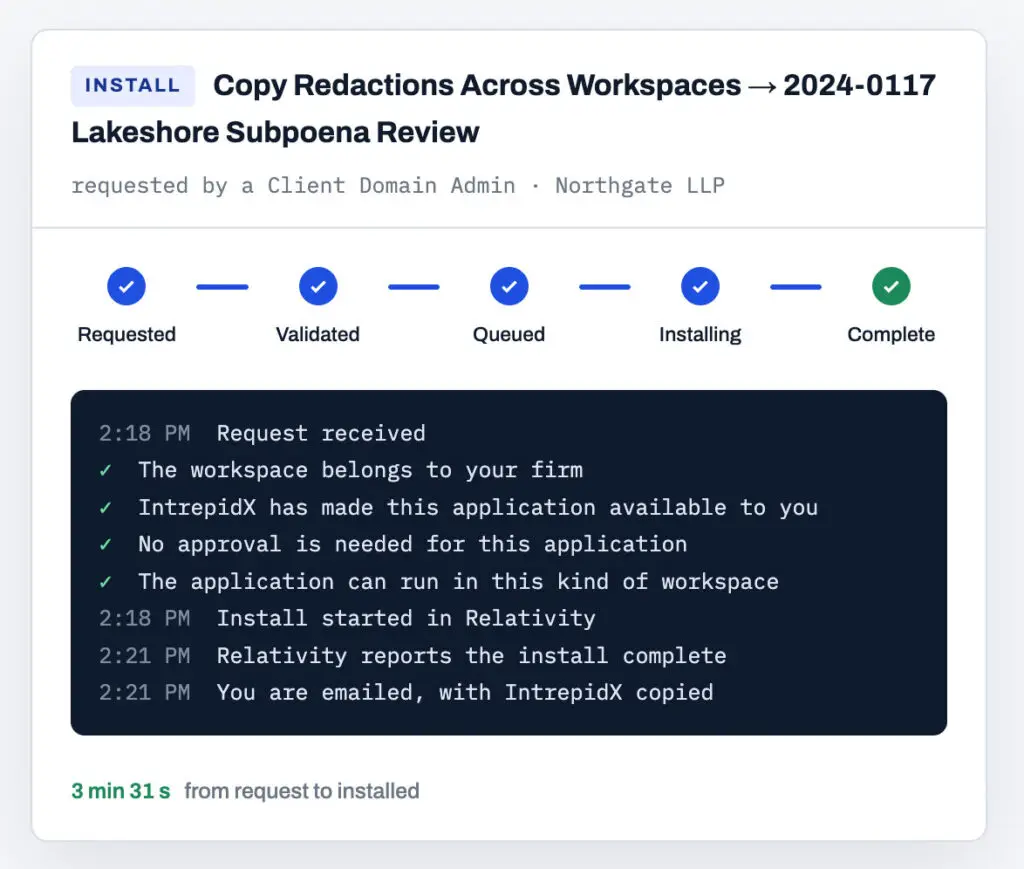
Before installation begins, XApps confirms the workspace belongs to your firm, the application is available to your domain and it can run in that type of workspace.
Relativity Installs It
Click Install. Follow the request from start to finish and receive an email when the application is ready.
Everything You Need to Manage Your Relativity Apps.
One place to discover, install and manage the applications available to your firm.
⚡
Self-Service Installation
Request approved applications directly from your Relativity workspace.
💰
Cost Before Commitment
See whether an application affects your invoice before installation begins.
🗂️
Workspace Visibility
See what’s installed across every workspace in your domain.
✅
Approved App Catalog
Browse only the applications IntrepidX has made available to your firm.
🔄
Live Request Status
Follow every install from Requested through Complete.
♻️
Application Removal
Request removal from the same workflow and receive confirmation when it’s finished.
FAQ
Straight Answers
Does this change any Relativity permissions in our domain?
No. Your domain admins keep exactly the rights they have today. XApps adds one tab and nothing else.
Can we install an application that isn't in the catalog?
Ask IntrepidX to publish it. Anything IntrepidX has not published is invisible to every firm, which is the safe starting point. Applications Relativity already installs in every workspace are not listed, because there is nothing to decide about them.
What about applications that don't work in repository workspaces?
XApps follows Relativity’s published list. Those applications are not offered for repository workspaces.
How fast is an install?
Your request is submitted at once. Relativity typically finishes a small application within a few minutes. The page updates on its own while it runs, and you get an email at the end.
Is it safe to let our team install applications?
Yes. Every request is validated automatically, in seconds, before anything changes. A request can only reach your own firm’s workspaces, each firm sees only its own catalog, and Relativity’s audit records every install.
Where does our data go?
Nowhere new. XApps runs entirely inside your Relativity aiR instance and uses Relativity’s own services. There is no outside system.